If you're choosing between PCIe 4.0 and PCIe 5.0 NVMe SSDs for real work, PCIe 4.0 is still the best value for most builds in Thailand: it's fast enough for gaming, everyday apps, and typical creator workloads, with easier thermals and wider compatibility. PCIe 5.0 pays off mainly in sustained, heavy transfers on a compatible platform with good cooling.
Concise Performance Summary for Buyers
- For most users comparing SSD PCIe 4.0 vs PCIe 5.0, PCIe 4.0 delivers the most consistent price-to-performance in real applications.
- PCIe 5.0 is easier to "buy wrong" (platform limits, throttling, heatsink fit) than PCIe 4.0.
- If you rarely move huge files or run long writes, PCIe 5.0 peak speed often won't show up in day-to-day use.
- Thermals and sustained performance matter more than the interface version on spec sheets.
- When SSD PCIe 5.0 ราคา is close to a strong PCIe 4.0 model, PCIe 5.0 can be a reasonable premium pick-only if your motherboard and cooling support it.
Why PCIe Version Matters for Real-World SSD Performance
Use these criteria to decide whether PCIe 4.0 or 5.0 will change your actual workflow (not just synthetic peaks):
- Sustained transfers (not burst): Long writes/reads (copying project folders, game libraries, cache) expose heat and SLC-cache limits.
- Random IO and latency at low queue depth: App/game responsiveness is usually more about small IO behavior than maximum sequential throughput.
- Controller efficiency and throttling: A cooler, efficient PCIe 4.0 drive can feel faster than a hot PCIe 5.0 drive that throttles.
- NAND type and cache design: DRAM vs DRAM-less (HMB), and how quickly the drive slows after cache is filled.
- Capacity choice: Higher capacities often sustain performance better and give more spare area for consistency.
- Motherboard lane routing: Some M.2 slots share lanes with GPU/SATA; the "fastest slot" isn't always the one you're using.
- Cooling and case airflow: PCIe 5.0 frequently needs a proper heatsink and airflow to avoid drops during long tasks.
- Warranty and endurance policy: Useful as a quality signal when comparing similarly priced models.
Typical Workloads: Where PCIe 4.0 Holds Up
In common workloads, the biggest difference is often consistency and thermals, not headline speed. If you're mainly comparing SSD PCIe 4.0 ราคา across brands, prioritize a strong PCIe 4.0 model with good sustained behavior before paying extra for PCIe 5.0.
Quick comparison (qualitative)
| Tier | Throughput (real-world) | Latency / small-IO feel | Price tendency in TH | Platform support |
|---|---|---|---|---|
| PCIe 4.0 mid-to-high end | High; typically "enough" for gaming + creator work | Often excellent; can be very responsive | Best value; frequent discounts | Very broad (most modern AMD/Intel boards) |
| PCIe 5.0 (properly cooled) | Very high in large sequential tasks; best for sustained heavy transfers | Sometimes similar to good PCIe 4.0 at low queue depth | Premium; varies by model and bundle heatsink | Requires PCIe 5.0-capable M.2 slot to benefit; cooling matters more |
Practical variants to choose from
| Variant | Who it fits | Pros | Cons | When to choose |
|---|---|---|---|---|
| PCIe 4.0 "value" NVMe (DRAM-less + HMB) | Everyday PC, student/work laptop upgrades, light gaming | Lowest cost per GB; big upgrade from SATA; runs cool | Can slow more on long writes; heavier multitasking can feel less consistent | When budget is strict and your tasks are mostly apps, browsing, office, and moderate installs |
| PCIe 4.0 performance NVMe (with DRAM or strong HMB design) | Mainstream gaming + content creation; "one-drive does it all" | Great responsiveness; better sustained behavior; easy to cool | Costs more than entry PCIe 4.0 | When you want the safest recommendation for SSD NVMe PCIe 4.0 ยี่ห้อไหนดี without paying PCIe 5.0 premiums |
| PCIe 4.0 high-end NVMe (top controllers, strong sustained writes) | Prosumer editing, big project folders, frequent large copies | Stable under longer transfers; typically strong firmware and support | Diminishing returns vs mid/high PCIe 4.0 in casual use | When you want near-flagship behavior but prefer lower heat and easier compatibility than PCIe 5.0 |
| PCIe 5.0 "entry" (often runs hot; needs heatsink) | Enthusiasts who want PCIe 5.0 now, but mostly do mixed workloads | Future-leaning; can be fast in large reads/writes if cooled | Thermal throttling risk; may not feel faster than good PCIe 4.0 in daily tasks | When you plan to ซื้อ SSD NVMe PCIe 5.0 and you already have a PCIe 5.0 M.2 slot plus a serious heatsink/airflow |
| PCIe 5.0 high-end (with strong cooling solution) | Heavy sustained transfers, scratch/cache disks, professional pipelines | Best headroom for long sequential workloads; top-end burst plus better sustained behavior (with cooling) | Highest cost; can be physically tall; may conflict with GPU/backplates or M.2 covers | When your workflow is limited by storage transfer time and you can keep it cool for long runs |
Workflows That Actually Benefit from PCIe 5.0
- If you regularly move multi-hundred-GB project folders between drives (camera masters, game capture archives), then PCIe 5.0 can reduce waiting-provided the destination/source and cooling can sustain speed.
- If you use the SSD as a dedicated scratch/cache disk for editing or compositing (temporary renders, proxies, caches), then PCIe 5.0 helps most when the workload is long and write-heavy.
- If you run VMs/containers with frequent large images and you snapshot/clone often, then PCIe 5.0 can help in bulk operations, while latency gains may still be modest.
- If you do repeated large dataset staging (local AI datasets, large code/data checkouts, backups), then PCIe 5.0 can be worth it when your process is truly storage-bound.
Budget-first note: If PCIe 5.0 pricing in your cart is forcing you to drop capacity (e.g., 2TB to 1TB), PCIe 4.0 at higher capacity often wins overall. Premium note: If you can afford both capacity and cooling, PCIe 5.0 is a sensible "no-regrets" upgrade for sustained-transfer professionals.
Latency, Queue Depths, and Small-IO Behavior
- List your top 3 apps/games and identify whether you're mostly launching/loading (small IO) or constantly copying/rendering (large IO).
- If your PC "feels slow" in app switching and general responsiveness, prioritize a strong PCIe 4.0 drive with good small-IO/firmware consistency before chasing PCIe 5.0 peaks.
- If your pain is long waits during imports/exports/copies, prioritize sustained behavior (cooling + cache design) even within the same PCIe generation.
- Check whether your work is usually single-task (low queue depth) or many parallel jobs (higher queue depth); PCIe 5.0's advantage tends to show more under heavier parallelism and large blocks.
- Decide on capacity first; then pick the best controller/thermal package you can afford at that capacity.
- Only pay the PCIe 5.0 premium after confirming: (a) PCIe 5.0 M.2 slot, (b) adequate heatsink/airflow, (c) no slot-sharing constraints that reduce lanes.
Platform Compatibility, Power, and Thermal Constraints
- Buying PCIe 5.0 but installing it into a PCIe 4.0 M.2 slot (it will work, but you won't get PCIe 5.0 benefits).
- Assuming "PCIe 5.0" on the motherboard means every M.2 slot is PCIe 5.0; often only one slot is.
- Ignoring heatsink height: some PCIe 5.0 drives ship with tall heatsinks that can collide with GPU backplates or motherboard M.2 covers.
- Relying on a decorative motherboard M.2 cover with poor thermal pads; it may look like a heatsink but perform worse than expected.
- Mounting the hottest drive under the GPU where airflow is weakest, then blaming the SSD for throttling.
- Overpaying for PCIe 5.0 while keeping an older CPU/chipset that bottlenecks lanes or reduces overall system balance.
- Choosing the cheapest model in a generation without checking sustained-write behavior; some drives slow sharply after cache fills.
- Not updating BIOS/firmware when platform compatibility issues appear (sleep/wake, stability, or link-speed negotiation quirks).
Price-to-Performance: Choosing Under a Tight Budget
Best value for most buyers in Thailand is a solid PCIe 4.0 "performance" NVMe at the capacity you actually need; it usually beats stretching for PCIe 5.0 and compromising on space or cooling. Best fit for heavy, sustained-transfer pros is PCIe 5.0 paired with a confirmed PCIe 5.0 M.2 slot and serious heatsinking, chosen only when the premium over SSD PCIe 4.0 ราคา makes sense for your workload.
Buyer's Practical Questions and Quick Answers
Will I notice PCIe 5.0 in gaming and Windows everyday use?
Usually not much. Day-to-day feel is more tied to small-IO latency and consistency, where good PCIe 4.0 drives already perform very well.
Is it worth paying extra when SSD PCIe 5.0 ราคา drops near PCIe 4.0?
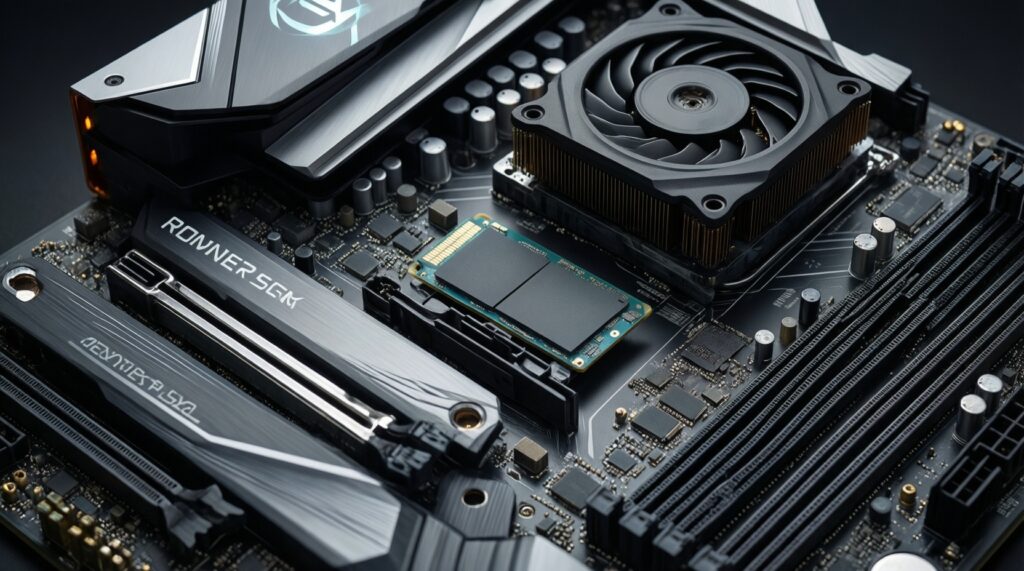
Yes only if you have a PCIe 5.0-capable M.2 slot and adequate cooling. Otherwise, treat it as a PCIe 4.0 drive you paid extra for.
What's the safest default recommendation if I'm unsure?
A PCIe 4.0 performance-class NVMe at an appropriate capacity is the lowest-risk choice: strong responsiveness, easier thermals, broad compatibility.
When should I choose PCIe 5.0 over a higher-capacity PCIe 4.0?
Choose PCIe 5.0 when your workflow is repeatedly blocked by long, sustained transfers and you can keep the drive cool. If capacity constraints will hurt you, prioritize capacity first.
SSD NVMe PCIe 4.0 ยี่ห้อไหนดี: what should I compare besides brand?
Compare sustained performance behavior, warranty/support, thermals with your motherboard heatsink, and whether the drive has DRAM or a well-implemented HMB design.
Do I need a heatsink for PCIe 4.0 or PCIe 5.0?
PCIe 4.0 often works fine with a basic motherboard heatsink. PCIe 5.0 is much more likely to need a proper heatsink and airflow to avoid throttling during long tasks.